
So, Friday I ran out of Codex (shoutout Tibo) and thought, "well shit, what do I do now." I was then met with a Revelation that no limiting factor should ever stop me. If losing access to any one particular model stops all your motion, then you're not utilizing your mind nor system to the best of its capabilities.
In this day and age, you must be a warrior in the tech space. Your mind is your armor, and your machine is your sword. Frontier models are the treasury, while local models are your savings.
How to pick a Model 101
qwen3.5 Ollama
Instead of waiting for my Codex limits to reset, I finally learned the basics of local models since I've been telling myself to do so for months. I downloaded Qwen 3.5 through Ollama and started figuring out what all these letters and numbers actually meant. I want to spread what I learned because once you understand the basics, the main things holding you back are your hardware and your skills.
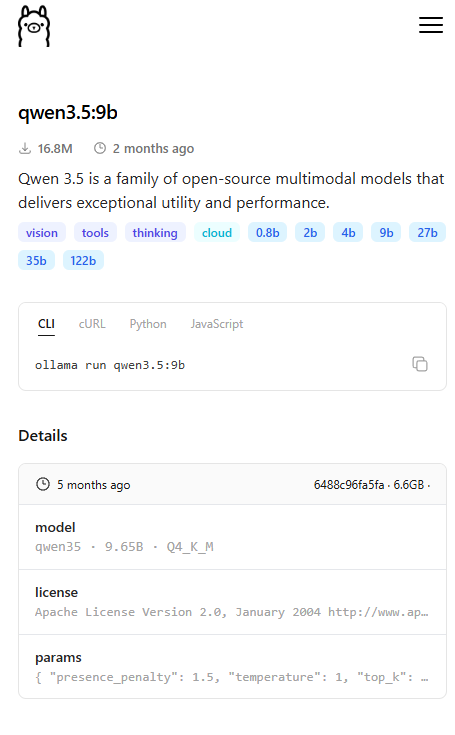
1. WTF is the b in 9b = The b represents the number of parameters by the billions. A good rule of thumb for a Q_4 model is roughly 0.5–0.6 GB of memory per billion parameters + extra for context window and overhead. A good starting point for your average machine is a 4b-9b model. 2. WTF is the Q in Q4 = this represents the quantization techniques used to compress and reduce the size of a model's neural net by reducing the precision of its weights. Starts at Q1-3, and is the dumbest but fastest version of a model. Lower quant = more compressed, leading to faster speeds due to less memory usage while lowering the precision of the weights. Models with a higher quant number ( Q6, Q7, Q8) are less compressed and therefore can be more precise with their answers. Q_4 is a good sweet spot for most models. On a basic level, quantization and parameter size are all that would hold you back depending on your hardware and the overall size of the model; however, I have a few extra points I'd like you to know
3. Architecture = This represents the underlying design of a model, which is built of different transformers, tokenizers, etc., ultimately leading to uniquely designed neural nets. Different families use different architectures, which is why models with similar params can behave differently (Llama, Qwen, Gemma, DeepSeek) 4. Embedding = Human language is converted into tokens, and then tokens are turned into a list of numbers called an embedding. Models can't "read English," so they convert it into tokens, which are then converted into a vector of numbers. Higher embedding dimensions let the model capture more diverse relationships and patterns between words and concepts, but they don’t automatically make a model better. 5. Temperature = Controls the Randomness of a model. Closer to 0 leads to a more direct and focused model, while a higher temperature will lead to a more diverse output from your model.
With all of these factors put together, you should have no problem installing your new Q4 model. As a matter of fact, try this one out. First install Ollama: Download Ollama on Windows Now grab your abliterated model: Llama-3.2-3B-Instruct-abliterated.Q4_K_M.gguf
A GGUF file is a compressed version of the model using quantization so it can be run on more consumer hardware. Now save this model to a file named Modelfile echo 'FROM ./Llama-3.2-3B-Instruct-abliterated.Q4_K_M.gguf' > Modelfile
Now run this command, and you have your own running uncensored model bash ollama create Llama3.2-abliterated -f Modelfile
ollama run llama3.2-abliterated
In this lesson, I learned:
How to look at the specs of a model and actually understand if it will fit and run on my system. How to download a GGUF file and make it a model for Ollama. How to have an independent edge even if you lose your Frontier access.
I hope that some of you guys can take this info and make yourself a new local backup system just for a rainy day. I'm DumbButt, and I make training loops and agentic systems. Follow me for more research on the further advanced topics in AI and agents.